Azure Active Directory as a service is Microsoft’s cloud-delivered identity and access management (IAM) platform. It lets organizations authenticate users, secure applications and enforce access policies without running a single domain controller. Since 2023, Microsoft has branded it Microsoft Entra ID, but the technology, the tenants and the search demand still revolve around the name Azure AD. This guide explains how the platform works, what it costs, how to deploy it, and where most teams go wrong.
Table of Contents
What Is Azure Active Directory as a Service?
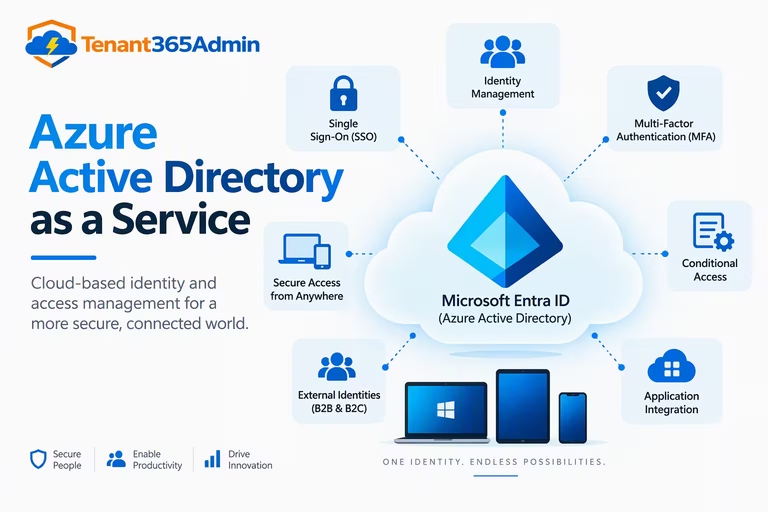
Traditional Active Directory Domain Services (AD DS) was built for a world of office networks, domain-joined PCs and file servers. Identity lived inside the perimeter. Today your users sign in from personal phones, your apps live in SaaS platforms, and your perimeter is effectively gone.
Azure Active Directory as a service replaces the “server you maintain” model with a “tenant you configure” model. Microsoft operates the infrastructure, handles patching, replication, scaling and high availability, and you manage identities and policies through the Entra admin center, PowerShell or Microsoft Graph.
It is worth being precise here. Azure AD is not a hosted copy of on-premises Active Directory. It doesn’t use LDAP, Kerberos or Group Policy natively. It speaks modern protocols: OAuth 2.0, OpenID Connect, SAML 2.0 and SCIM. If you need legacy protocols in the cloud, the separate Microsoft Entra Domain Services product provides a managed domain.
Why Businesses Adopt Azure Active Directory as a Service
Teams usually arrive at Azure Active Directory as a service for one of four reasons.
- Microsoft 365 requires it. Every Microsoft 365 and Azure subscription is backed by an Entra ID tenant. You already have one.
- Zero-trust initiatives. Identity is the control plane for zero trust, and Conditional Access policies are the enforcement point.
- Infrastructure reduction. Retiring domain controllers, ADFS farms and VPN-dependent authentication cuts cost and attack surface.
- SaaS sprawl. Hundreds of apps with separate passwords create security gaps and helpdesk tickets. Single sign-on (SSO) fixes both.
Core Capabilities You Should Know
Single Sign-On (SSO)
Entra ID’s gallery contains thousands of pre-integrated SaaS applications, including Salesforce, ServiceNow, Workday, AWS, Slack and Zoom. Users sign in once and reach everything they’re entitled to. Custom and line-of-business apps can be onboarded using SAML or OpenID Connect, and on-premises web apps can be published securely through Application Proxy without opening inbound firewall ports.
Multi-Factor Authentication (MFA)
MFA blocks the overwhelming majority of credential-based attacks. Entra ID supports the Microsoft Authenticator app (with number matching), FIDO2 security keys, passkeys, Windows Hello for Business and certificate-based authentication. Prefer phishing-resistant methods for administrators and high-value roles.
Conditional Access
Conditional Access is the engine of the platform. Policies evaluate signals such as user, group, device compliance, location, application sensitivity and sign-in risk, then decide whether to allow, block or require additional controls. A well-designed baseline looks like this:
- Require MFA for all users and all cloud apps
- Block legacy authentication protocols
- Require compliant or hybrid-joined devices for sensitive apps
- Require phishing-resistant MFA for admin roles
- Block or step up access from high-risk sign-ins and locations
Identity Protection
Using signals from Microsoft’s global telemetry, Identity Protection detects risky sign-ins (anonymous IPs, impossible travel, leaked credentials) and risky users. You can automate responses, such as forcing a password reset or requiring MFA, without waiting for an analyst.
Privileged Identity Management (PIM)
Standing admin access is one of the most common causes of serious breaches. PIM provides just-in-time elevation with approval workflows, time-bound assignments and full audit trails, so Global Administrator is something people activate for an hour rather than hold permanently.
Identity Governance
Access reviews, entitlement management, lifecycle workflows and automated joiner-mover-leaver processes keep access aligned with business need. These features matter most for regulated industries and any organization preparing for ISO 27001, SOC 2 or HIPAA audits.
B2B and B2C Collaboration
Entra External ID lets you invite partners and vendors using their own credentials, and build customer-facing sign-in experiences for consumer apps. This removes the need to create and manage guest passwords.
Azure Active Directory Licensing and Pricing
Pricing is where most buyers get confused, so here is how the tiers are structured. Verify current rates on Microsoft’s pricing page, since regional prices and bundles change.
| Tier | Best For | Headline Capabilities |
|---|---|---|
| Free | Small teams, Microsoft 365 baseline | Basic SSO, security defaults, user and group management |
| P1 | Most businesses | Conditional Access, self-service password reset with writeback, dynamic groups, Application Proxy, hybrid features |
| P2 | Regulated or high-risk organizations | Everything in P1, plus Identity Protection and Privileged Identity Management, plus advanced governance |
| Governance add-on | Large enterprises | Lifecycle workflows, access reviews at scale, entitlement management |
As a rough guide, P1 has historically been priced at about $6 per user per month and P2 at about $9. Many organizations never buy these standalone: Microsoft 365 Business Premium includes P1, and Microsoft 365 E3 and E5 include P1 and P2 respectively. Before purchasing anything separately, audit your existing Microsoft 365 licenses, because you may already be paying for Conditional Access.
Cost-Optimization Tips
- Assign P2 only to users who need it (admins, executives, privileged roles) rather than the whole organization, where licensing rules permit.
- Use security defaults on the free tier if you truly cannot license P1, though Conditional Access is far more flexible.
- Retire unused apps and stale guest accounts to cut both cost and risk.
Azure Active Directory as a Service vs. On-Premises Active Directory
| Factor | On-Premises AD DS | Azure AD / Entra ID |
|---|---|---|
| Protocols | Kerberos, NTLM, LDAP | OAuth 2.0, OIDC, SAML, SCIM |
| Management | Servers, patching, replication | Cloud-managed, Microsoft operated |
| Device management | Group Policy | Intune, Conditional Access |
| Availability | You design and maintain it | Microsoft SLA-backed |
| Best for | Legacy apps, file servers | Cloud and SaaS apps, remote work |
Most mid-size and large organizations run both. That is hybrid identity, and it is a perfectly valid end state rather than a stepping stone.
Hybrid Identity: Connecting On-Premises to the Cloud
If you already have AD DS, you synchronize identities to Entra ID using Microsoft Entra Connect (or the lightweight Cloud Sync agent). You then choose an authentication method:
- Password Hash Synchronization (PHS): The simplest and most resilient option. It also powers leaked-credential detection. Microsoft recommends it for most organizations.
- Pass-Through Authentication (PTA): Validates passwords against on-premises domain controllers in real time, without storing hashes in the cloud.
- Federation (ADFS): Highest complexity and operational burden. Migrate away from it unless a specific requirement forces you to stay.
For most organizations, the best practice is PHS with seamless SSO, backed by Conditional Access. This removes ADFS servers from your critical path.
A Practical Deployment Roadmap
Rolling out Azure Active Directory as a service doesn’t have to be a big-bang project. A phased plan works best.
Phase 1: Foundation (weeks 1 to 2)
Create and verify your custom domains. Establish two emergency-access “break-glass” accounts excluded from Conditional Access, protected with long passwords or FIDO2 keys and monitored by alerts. Enable audit and sign-in log export to a SIEM or Log Analytics.
Phase 2: Secure Authentication (weeks 2 to 4)
Register users for MFA, enable self-service password reset and deploy baseline Conditional Access policies in report-only mode first. Review the impact, then enforce.
Phase 3: App Integration (weeks 4 to 8)
Move high-traffic SaaS apps to SSO, publish internal apps via Application Proxy and enable automatic user provisioning with SCIM.
Phase 4: Device and Governance Maturity (weeks 8 onward)
Join or register devices, integrate with Intune compliance, enable PIM for all privileged roles and start quarterly access reviews.
Common Mistakes to Avoid
- Locking yourself out. Always test Conditional Access in report-only mode, and keep break-glass accounts.
- Too many Global Administrators. Aim for fewer than five, and use least-privilege built-in roles for everything else.
- Ignoring legacy authentication. Protocols like IMAP, POP and SMTP basic auth bypass MFA entirely. Block them.
- Leaving guest accounts unreviewed. External users accumulate quietly. Schedule access reviews.
- Treating MFA as the finish line. Attackers now use token theft and adversary-in-the-middle phishing. Add device compliance, token protection and phishing-resistant methods.
- Skipping monitoring. Identity logs are among your highest-value security data. Alert on role changes, new app consents and risky sign-ins.
Security Best Practices Checklist
- Enforce phishing-resistant MFA for all administrators
- Use PIM for just-in-time privileged access
- Block legacy authentication tenant-wide
- Restrict user consent to third-party apps
- Require compliant devices for sensitive workloads
- Enable Identity Protection risk policies
- Review app registrations and service principals for stale secrets
- Export logs and alert on anomalies
- Run regular access reviews for groups, apps and guests
Who Should Use Azure Active Directory as a Service?
Nearly any organization using Microsoft 365, Azure or modern SaaS applications should. It is especially compelling for remote and hybrid workforces, companies pursuing zero trust, fast-growing businesses that can’t afford to build identity infrastructure and enterprises consolidating multiple identity providers. The main exceptions are organizations with heavily legacy-bound workloads, which will need a hybrid approach rather than a pure cloud model.
Frequently Asked Questions
1. Is Azure Active Directory the same as Microsoft Entra ID?
Yes. Microsoft renamed Azure Active Directory to Microsoft Entra ID in 2023. The service, tenants, APIs and features carry over, and the name Azure AD still appears in many tools and older documentation.
2. Is Azure Active Directory as a service free?
There is a free tier that includes basic SSO, user and group management and security defaults. Advanced features such as Conditional Access, Identity Protection and PIM require paid P1 or P2 licenses, often bundled in Microsoft 365 plans.
3. What is the difference between Azure AD and Active Directory Domain Services?
AD DS is the traditional on-premises directory using Kerberos, NTLM and LDAP. Azure AD is a cloud identity service built around modern web protocols like OAuth, OpenID Connect and SAML. They are complementary and can be synchronized in a hybrid setup.
4. Can Azure AD replace my on-premises Active Directory?
Sometimes. If your workloads are cloud-based and your devices are managed through Intune, a cloud-only model works well. If you depend on Group Policy, legacy apps or file servers, keep AD DS or use Microsoft Entra Domain Services alongside Entra ID.
5. How does Azure Active Directory pricing work?
Pricing is per user per month, based on the tier (Free, P1 or P2) plus optional governance add-ons. P1 and P2 are frequently included in Microsoft 365 Business Premium, E3 and E5, so check your current licenses before buying separately.
6. Is Azure AD secure enough for regulated industries?
Yes, when configured properly. It supports compliance frameworks such as ISO 27001, SOC 2 and HIPAA. Pair it with Conditional Access, PIM, logging and regular access reviews to meet audit expectations.
7. How long does an Azure AD migration take?
A foundational rollout of MFA, SSO and Conditional Access often takes four to eight weeks for a mid-size organization. Full device, governance and legacy-app modernization can take several months.
Final Thoughts
Azure Active Directory as a service has evolved from a simple directory into a full identity security platform, now delivered as Microsoft Entra ID. The winning strategy is straightforward: start with strong authentication, enforce Conditional Access, minimize standing privilege, and build governance over time. Done well, it reduces cost, shrinks your attack surface and gives your users a faster, simpler sign-in experience.
If you are planning a migration or an audit, begin by reviewing the licenses you already own. You may be closer to a mature zero-trust identity posture than you think.
Single Sign On with Entra ID: Best Microsoft 365 SSO Guide
Device-Bound Passkeys in Entra ID: Ultimate Setup Guide
Windows Hello for Business: Ultimate Intune Deployment Guide
