Azure Active Directory Licensing decides how much you pay for identity security, which controls your tenant can enforce, and whether your next audit goes smoothly or turns into an expensive surprise. After years of reviewing tenants for organizations of every size, I can tell you the same pattern repeats: companies overpay for premium tiers they barely use, or they run critical workloads on a tier that cannot legally cover the features they have switched on.
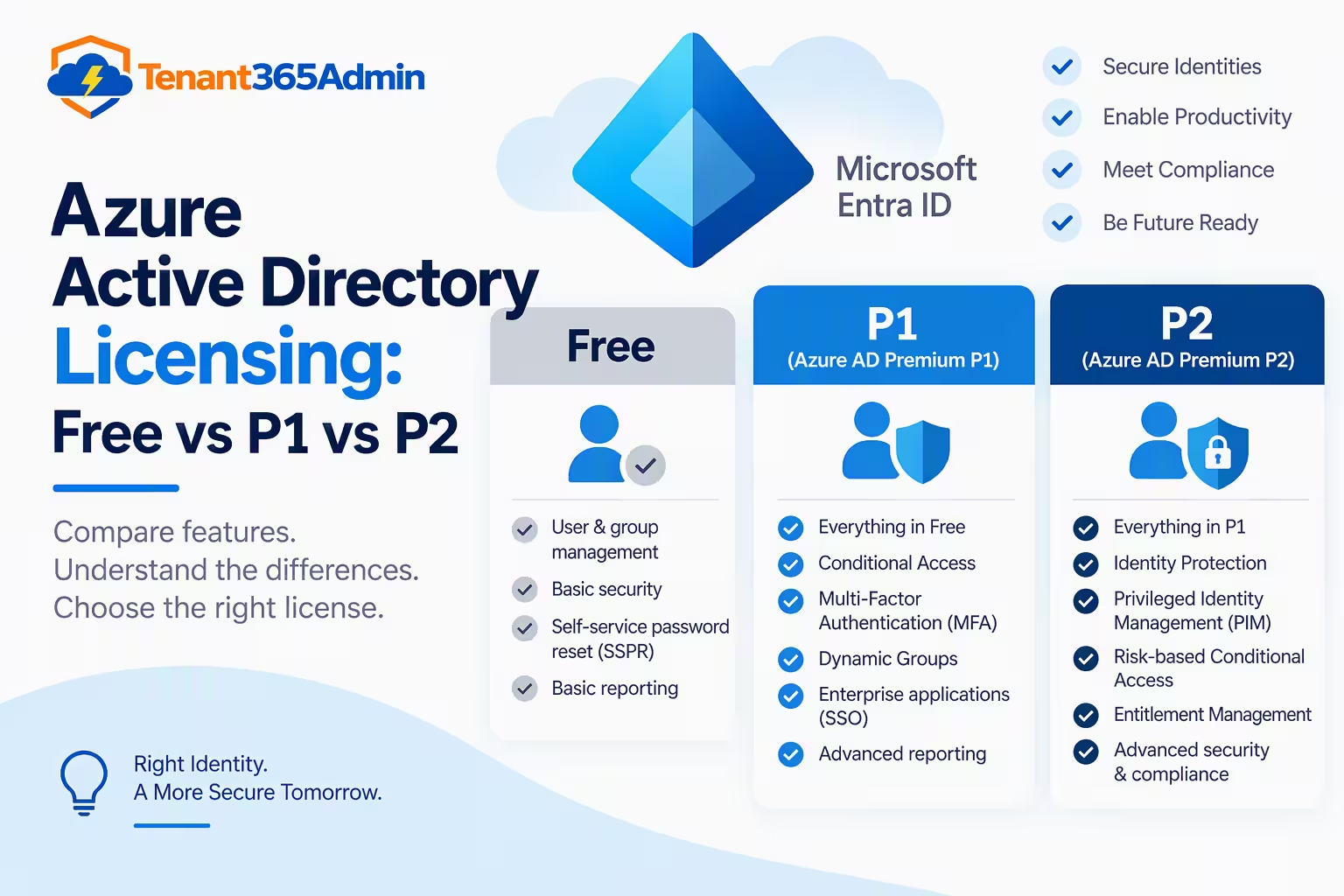
This guide breaks down Azure Active Directory Licensing across Free, Basic, P1 and P2 in plain language, with the practical detail a license manager actually needs: what each tier includes, which Microsoft bundles already cover you, where compliance gaps hide, and how to cut spend without weakening security.
Table of Contents
A Quick Note on Naming: Azure AD Is Now Microsoft Entra ID
Before we go further, a clarification that trips up many buyers. Microsoft renamed Azure Active Directory to Microsoft Entra ID in 2023. The product, the tiers and the licensing model carried over; only the branding changed. You will still see “Azure AD” in older documentation, PowerShell modules, contracts and search results, which is why Azure Active Directory Licensing remains the term most administrators and procurement teams use.
In this article, “Azure AD” and “Entra ID” mean the same service. The tiers map directly: Entra ID Free, Entra ID P1 and Entra ID P2, with Basic being a legacy edition.
Why Azure Active Directory Licensing Matters More Than Ever
Identity is now the primary security perimeter. Conditional Access, risk-based sign-in policies, privileged access controls and access reviews are not nice-to-have extras; they are the controls cyber insurers, auditors and regulators ask about first.
Getting Azure Active Directory Licensing wrong has two costs:
- Overspending: assigning P2 to every user when only a small group needs it can add six figures annually in a large tenant.
- Non-compliance: enabling a premium feature for users who are not licensed for it violates Microsoft’s terms and can surface during a true-up or audit.
A well-managed licensing strategy sits between those two failures. Let’s walk through each tier.
Azure AD Free: What You Get at No Extra Cost
The Free edition is included with any Microsoft cloud subscription, including Microsoft 365 Business Basic and Standard, Azure, Dynamics 365 and Power Platform. If you have a tenant, you have Free.
Core capabilities typically include:
- Cloud user and group management
- Directory synchronization with on-premises Active Directory through Microsoft Entra Connect
- Single sign-on to Microsoft 365 and many SaaS applications
- Basic security and usage reports
- Self-service password change for cloud users
- Security defaults, which enforce multi-factor authentication for administrators and prompt users to register
Who Free suits: small businesses, startups, test tenants and organizations with simple needs and low risk exposure.
Where Free falls short: there is no Conditional Access, no granular MFA policy control, no password writeback to on-premises, no dynamic groups and no access reviews. The moment your security team says “block sign-ins from unmanaged devices” or “require MFA only outside the office network,” you have outgrown Free.
Azure AD Basic: The Legacy Tier
Basic was the entry-level paid edition in early Azure Active Directory Licensing, designed to add business-grade features such as company branding, group-based application access, self-service password reset for cloud users and the Application Proxy, backed by a 99.9 percent SLA.
Microsoft has since moved away from it. Basic is no longer sold as a standalone option to new customers, and its features have largely been folded into Free or P1. If you see Basic on an old invoice or enrollment, treat it as a legacy artifact and plan a migration to P1 or Free depending on the features you truly rely on.
License manager tip: during any tenant review, search your agreements and assigned-license reports for leftover Basic entries. Paying for a deprecated tier is a classic hidden cost.
Azure AD Premium P1: The Workhorse of Identity Security
P1 is where most organizations should land. It adds the controls that make modern zero-trust practical:
- Conditional Access: enforce MFA, device compliance, location and app-based rules for every sign-in
- Hybrid identity features: self-service password reset with on-premises writeback, plus Entra Connect Health
- Dynamic groups: membership that updates automatically from user attributes, perfect for automated license assignment
- Group-based licensing and access management at scale
- Application Proxy for publishing internal web apps without a VPN
- Advanced MFA options and fuller reporting
- Microsoft Identity Manager rights for qualifying on-premises scenarios
In my experience, Conditional Access alone justifies P1. It is the single most effective control for preventing account takeover, and it is the baseline most cyber insurance questionnaires now expect.
List price (verify current rates with your Microsoft partner): roughly $6 per user per month on an annual commitment as a standalone purchase. However, most organizations never buy it standalone, because P1 is already bundled into common suites (covered below).
Azure AD Premium P2: Risk-Based Protection and Privileged Access
P2 includes everything in P1 and adds the advanced governance and threat-protection layer:
- Microsoft Entra ID Protection: risk-based Conditional Access that detects leaked credentials, impossible travel, anonymous IP sign-ins and other risky behavior, then responds automatically
- Privileged Identity Management (PIM): just-in-time, time-bound and approval-based elevation for admin roles, with full audit history
- Access reviews: recurring attestation of who has access to groups, apps and roles
- Entitlement management: access packages and lifecycle workflows for employees, partners and guests
List price (verify current rates): roughly $9 per user per month standalone on an annual commitment.
Who needs P2: regulated industries such as finance, healthcare and government; organizations with large numbers of privileged administrators; companies facing audit requirements for access recertification; and any business with a mature security operations function.
The licensing nuance many teams miss: P2 does not always have to cover every user. For PIM, you generally need P2 only for the users who are eligible for or manage privileged roles. For Entra ID Protection and risk-based policies, the licensing requirement applies to the users those policies cover. Scoping carefully is how mature teams control Azure Active Directory Licensing spend.
Azure Active Directory Licensing Comparison Table
| Capability | Free | Basic (legacy) | P1 | P2 |
|---|---|---|---|---|
| User and group management | Yes | Yes | Yes | Yes |
| Entra Connect sync | Yes | Yes | Yes | Yes |
| Security defaults | Yes | Yes | Yes | Yes |
| Company branding | Limited | Yes | Yes | Yes |
| Application Proxy | No | Yes | Yes | Yes |
| Conditional Access | No | No | Yes | Yes |
| Dynamic groups | No | No | Yes | Yes |
| SSPR with writeback | No | No | Yes | Yes |
| Identity Protection (risk-based) | No | No | No | Yes |
| Privileged Identity Management | No | No | No | Yes |
| Access reviews | No | No | No | Yes |
| Entitlement management | No | No | No | Yes |
Feature availability evolves, so always confirm against Microsoft’s current licensing documentation before purchasing.
Where Azure Active Directory Licensing Is Already Included
This is where real savings hide. Before buying anything standalone, check what your existing agreements already cover:
- Microsoft 365 Business Basic and Standard: Free
- Microsoft 365 Business Premium: includes P1
- Microsoft 365 E3 and Office 365 E3 with EMS E3: includes P1
- Microsoft 365 E5 and EMS E5: includes P2
- Enterprise Mobility + Security (EMS) E3 and E5: P1 and P2 respectively
Many organizations pay for a standalone P2 add-on while already holding E5 for the same users. Others hold E3 and have never turned on Conditional Access, effectively paying for a capability they do not use. Reconciling your bundle entitlements against actual feature use is the fastest win in any Azure Active Directory Licensing review.
Newer Azure Active Directory Licensing Add-Ons
Microsoft has expanded the Entra family beyond the classic four tiers:
- Microsoft Entra ID Governance: an add-on for advanced lifecycle workflows, access reviews and entitlement management at scale, layered on top of P1 or P2
- Microsoft Entra Suite: a bundle that combines ID Governance, Private Access, Internet Access and verification capabilities
- Microsoft Entra External ID: consumption-based pricing for customer and partner identity scenarios
- Workload Identities Premium: licensing for non-human identities such as service principals
These matter when you evaluate the long-term roadmap, because some capabilities that used to sit inside P2 are increasingly positioned in governance add-ons.
How Azure Active Directory Licensing Actually Works Operationally
Understanding the mechanics of Azure Active Directory Licensing prevents most compliance mistakes.
Per-user model. Licenses are assigned to individual users, not tenants or devices. A user benefits from premium features only if they hold the relevant license.
Group-based licensing. Rather than assigning licenses manually, assign them to security groups. When a user joins the group, they receive the license; when they leave, it is reclaimed. Combined with dynamic groups from P1, this automates most of the joiner-mover-leaver lifecycle.
License assignment errors. Conflicting service plans, insufficient seats and missing usage location are the three most common causes of failed assignments. Always set usage location before assigning.
Trials. Microsoft offers trial periods for premium tiers. Use them to validate features, but track expiry dates, because features silently disable when the trial ends.
Guest users. External collaboration is licensed under a monthly active users model for External ID, with premium features for guests tied to the tenant’s licensing. Review the current guest licensing terms before enabling premium policies for external users.
How to Choose the Right Azure Active Directory Licensing Tier
Use this Azure Active Directory Licensing sequence when advising a client or your own leadership:
- Do you need Conditional Access or hybrid password writeback? If yes, P1 is your minimum.
- Do you have privileged administrators who need just-in-time access, or auditors demanding access recertification? If yes, add P2 for the relevant users.
- Do you have a security team that wants automated risk-based responses? P2 for the users in scope of those policies.
- Are you already on a Microsoft 365 or EMS bundle? Check the included tier first and activate unused features before purchasing anything.
- Is your tenant small, cloud-only and low-risk? Free with security defaults may be enough.
Seven Azure Active Directory Licensing Cost-Optimization Practices
- Audit assigned versus used licenses quarterly. Remove licenses from disabled, departed and inactive accounts.
- Scope P2 narrowly. Apply it to privileged roles and high-risk populations, not blindly to everyone.
- Use group-based licensing to eliminate manual errors and orphaned assignments.
- Compare bundles to standalone pricing. An M365 E5 uplift sometimes costs less than separate security products plus P2.
- Align renewal dates so every Entra-related agreement co-terminates and gives you negotiating leverage.
- Review service principals and guest accounts, which quietly inflate license counts.
- Document feature-to-license mapping so every enabled policy has a matching license on record.
Common Azure Active Directory Licensing Mistakes to Avoid
Enabling a P2 feature without P2 coverage. Risk-based Conditional Access policies applied to broad groups can create a gap between licensed and covered users.
Assuming Business Premium covers everything. It includes P1, not P2. Teams that need PIM or Identity Protection must add the appropriate license.
Ignoring renewals. Auto-renewing licenses for departed employees is pure waste.
Forgetting hybrid requirements. On-premises writeback features need P1 and a properly configured Entra Connect deployment.
Treating Basic as current. Legacy tiers deserve a migration plan, not indefinite renewal.
Frequently Asked Questions About Azure Active Directory Licensing
1. What is the difference between Azure Active Directory Licensing tiers Free, P1 and P2?
Free covers core identity and directory features. P1 adds Conditional Access, dynamic groups, hybrid password writeback and Application Proxy. P2 includes everything in P1 plus Identity Protection, Privileged Identity Management, access reviews and entitlement management.
2. Is Azure AD Basic still available?
Basic is a legacy edition that Microsoft no longer promotes or sells to new customers. Its functionality has largely moved into Free and P1, so existing Basic subscribers should plan a migration.
3. Do I need P2 for every user in my organization?
Not necessarily. PIM generally requires P2 for the users who are eligible for or administer privileged roles, and risk-based policies require P2 for the users they cover. Scoping carefully can significantly reduce costs.
4. Which Microsoft 365 plans include Azure AD P1 and P2?
Microsoft 365 Business Premium, E3 and EMS E3 include P1. Microsoft 365 E5 and EMS E5 include P2. Business Basic and Standard include only the Free tier.
5. How much does Azure Active Directory Licensing cost for Premium?
As a rough guide, P1 is around $6 and P2 around $9 per user per month on annual terms when purchased standalone. Prices vary by region, agreement type and currency, so confirm with Microsoft or your licensing partner.
6. Is Azure AD the same as Microsoft Entra ID?
Yes. Microsoft renamed Azure Active Directory to Microsoft Entra ID in 2023. The licensing tiers and features continued under the new name.
7. Can I use group-based licensing on the Free tier?
Group-based licensing is a feature of paid editions. Check the current documentation for your tenant, since Microsoft adjusts how it applies across subscriptions and bundles.
8. What happens if I use premium features without proper Azure Active Directory Licensing?
You risk non-compliance with Microsoft’s terms, which can lead to true-up charges during an audit. It is far cheaper to map features to licenses up front and correct gaps early.
9. How often should I review my Azure Active Directory Licensing?
Quarterly is a good cadence for most organizations, and always before renewal. Review assigned versus active users, bundle overlaps and any newly enabled security policies.
Final Thoughts
Azure Active Directory Licensing is not just a procurement task; it is a security and governance discipline. Free gives you the foundation, P1 delivers the controls most businesses need for real protection, and P2 adds the advanced governance and risk intelligence regulated or high-risk organizations require.
The smartest approach is to start with what your current Microsoft bundle already includes, map every enabled feature to a license, scope premium tiers to the users who genuinely need them and review the whole picture every quarter. Do that consistently and you will strengthen security while keeping identity spend under control.
If you manage licenses across multiple tenants or a growing workforce, build the audit into your calendar now. Your future self, and your finance team, will thank you.
Microsoft 365 E3 vs E5: Ultimate Expert Guide to Features, Pricing & Which One to Choose
Microsoft 365 E1 vs E3 vs E5 — Expert Guide to Choosing the Right Plan
Microsoft 365 Backup Solutions for Enterprises: Why This Topic Is Mission‑Critical in 2026
