M365 Copilot Use Cases are redefining how Finance and Healthcare organizations think, decide, and operate. Microsoft 365 Copilot—built on large language models, deeply grounded in Microsoft Graph, and governed by enterprise‑grade security. From complex financial forecasting to clinician documentation, Copilot work alongside professionals inside the apps they already use every day.
This is not automation for automation’s sake. This is intelligence embedded directly in work.
In this blog, I’ll walk you through real‑world, high‑impact M365 Copilot Use Cases across Finance and Healthcare—industries where accuracy, compliance, and trust are non‑negotiable.
Table of Contents
Why M365 Copilot Use Cases Matter in Regulated Industries
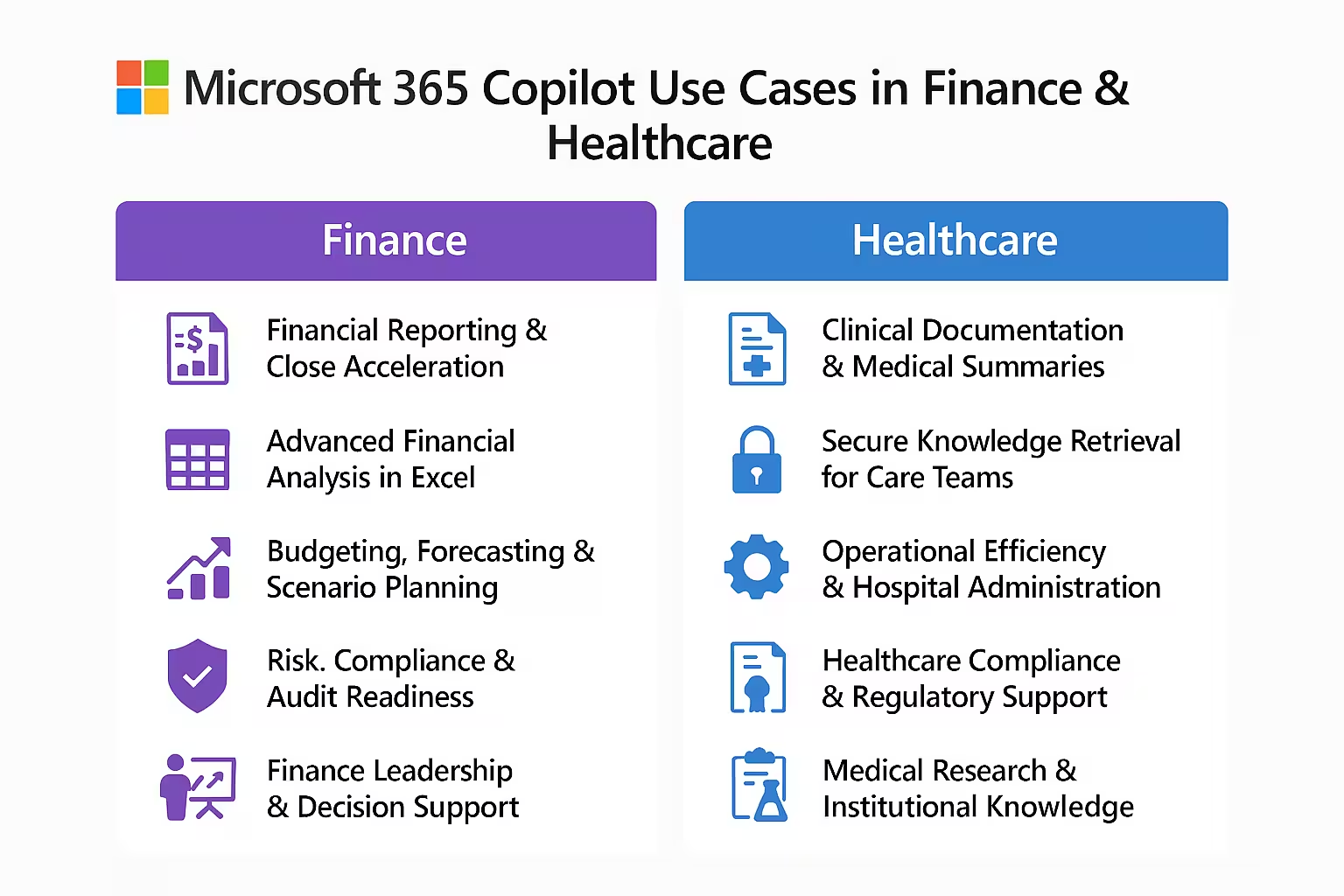
Finance and Healthcare share several challenges:
- Massive volumes of structured and unstructured data
- Strict regulatory and compliance mandates
- High cost of human error
- Increasing pressure for speed, personalization, and insight
Traditional AI tools sit outside these workflows. Copilot don’t.
Copilot operate inside Excel, Word, Outlook, Teams, Power Platform, and more, with permissions respected and data protected. That’s why M365 Copilot Use Cases are particularly powerful in these sectors.
M365 Copilot Use Cases in Finance
Finance isn’t just about numbers—it’s about judgment, risk, and accountability. Copilot help finance professionals move faster without sacrificing control.
1. Financial Reporting & Close Acceleration
One of the most impactful M365 Copilot Use Cases in Finance is accelerating month‑end and quarter‑end close.
How Copilot help:
- Summarize financial statements in Excel
- Explain variances across periods in natural language
- Draft management discussion sections in Word
- Answer ad‑hoc finance questions in plain English
Instead of manually stitching spreadsheets and narratives, finance teams can ask Copilot:
“Explain why operating expenses increased 12% this quarter.”
Copilot generate contextual explanations grounded in your data—saving hours every close cycle.
2. Advanced Financial Analysis in Excel
Excel remains the backbone of Finance—and Copilot make it smarter.
M365 Copilot Use Cases include:
- Creating formulas from natural language
- Analyzing trends, outliers, and correlations
- Generating pivot tables and charts automatically
- Running what‑if scenarios without manual modeling
You don’t need to remember syntax anymore. Ask, and Co-pilot translate business questions into analytical output.
3. Budgeting, Forecasting & Scenario Planning
Finance leaders constantly ask “What happens if?”
Copilot help answer that.
Using historical data, assumptions, and business context, Copilot:
- Build forecast models
- Compare optimistic vs pessimistic scenarios
- Summarize risks and sensitivities
- Present outcomes in executive‑ready language
This makes M365 Copilot Use Cases indispensable for FP&A teams balancing speed and strategy.
4. Risk, Compliance & Audit Readiness
Compliance work is essential—but time consuming.
Copilot support:
- Policy summarization and interpretation
- Audit document preparation
- Control evidence searches across SharePoint and OneDrive
- Risk register narrative generation
Because Copilot respect Microsoft Purview and role‑based access, Copilot only surface what users are allowed to see—making audits faster and safer.
5. Finance Leadership & Decision Support
Executives don’t want data. They want answers.
Copilot help CFOs by:
- Summarizing dashboards into decision briefs
- Preparing board‑ready presentations in PowerPoint
- Highlighting key risks and opportunities from reports
- Synthesizing insights from emails, meetings, and files
These M365 Copilot Use Cases shift Finance from reporting the past to shaping the future.
M365 Copilot Use Cases in Healthcare
Healthcare professionals face a different—but equally intense—set of demands: patient outcomes, safety, documentation, and burnout. Copilot was designed to help reduce cognitive load, not add to it.
6. Clinical Documentation & Medical Summaries
One of the most meaningful M365 Copilot Use Cases is reducing clinician documentation time.
Copilot can:
- Draft clinical summaries from notes
- Summarize patient histories
- Extract key information from referral documents
- Generate discharge summaries for review
This allows clinicians to spend more time with patients—and less time typing.
7. Secure Knowledge Retrieval for Care Teams
Healthcare information is scattered across emails, policies, research, and internal portals.
Copilot help staff ask:
“What is our protocol for post‑operative infection management?”
And receive:
- Policy‑accurate summaries
- Source‑linked answers
- Role‑appropriate information
Because Copilot inherit Microsoft 365 security controls, patient confidentiality remains protected.
8. Operational Efficiency & Hospital Administration
Hospitals operate like complex enterprises.
With M365 Copilot Use Cases, administrators can:
- Analyze staffing trends
- Create operational reports automatically
- Summarize patient flow bottlenecks
- Draft SOPs and internal communications
This leads to faster decisions and better resource utilization.
9. Healthcare Compliance & Regulatory Support
Regulations like HIPAA require absolute rigor.
Copilot support compliance teams by:
- Summarizing regulatory updates
- Drafting compliance documentation
- Preparing audit responses
- Comparing policy versions for changes
Because copilot don’t train on your organizational data and stay within compliance boundaries, trust is built into every interaction.
10. Medical Research & Institutional Knowledge
Researchers and academic hospitals benefit from Microsoft 365 Copilot Use Cases that accelerate insight.
Copilot help by:
- Summarizing medical literature
- Extracting themes from research documents
- Drafting research proposals
- Organizing findings across Teams and OneDrive
Research moves faster when information is accessible and contextualized.
Security, Privacy & Trust: The Foundation of All Microsoft 365 Copilot Use Cases
In Finance and Healthcare, security isn’t optional—it’s foundational.
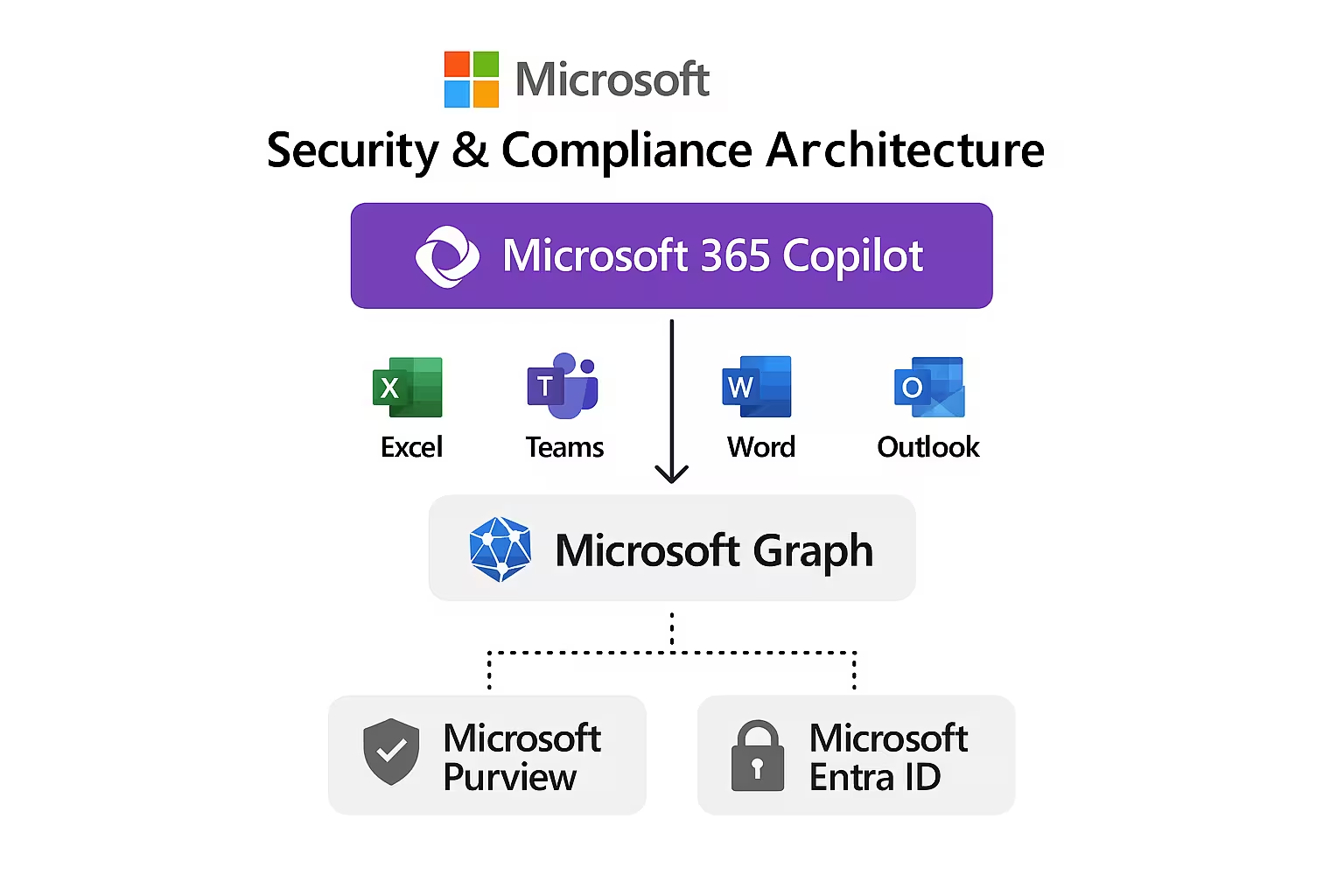
That’s why Copilot:
- Respect Microsoft Entra ID permissions
- Inherit Microsoft Purview compliance policies
- Do not train foundation models on customer data
- Keep data within your tenant
These safeguards make Microsoft 365 Copilot Use Cases viable in the most sensitive environments.
Top Microsoft 365 Compliance Features Every IT Admin Should Enable
Why These Microsoft 365 Copilot Use Cases Are Different
Unlike standalone AI tools, Copilot:
- Context‑aware (via Microsoft Graph)
- Embedded in daily workflows
- Governed by enterprise security
- Designed for human‑AI collaboration
Copilot don’t replace professionals—it amplify them.
The Future of Microsoft 365 Copilot Use Cases in Finance & Healthcare
What you see today is only the beginning.
Future Microsoft 365 Copilot Use Cases will increasingly include:
- Deeper integration with line‑of‑business systems
- Industry‑specific copilots built on the same foundation
- Autonomous workflow orchestration with human oversight
- Predictive and prescriptive intelligence
Finance and Healthcare organizations that adopt early will gain a durable advantage—not just in efficiency, but in insight.
Final Thoughts —Microsoft 365 Copilot
Microsoft 365 Copilot Use Cases in Finance and Healthcare represent a fundamental shift in how work gets done. By embedding secure, contextual AI directly into everyday tools, Copilot help professionals focus on what truly matters: judgment, care, and impact.
If your organization operates where precision matters and trust is critical, then Microsoft 365 Copilot Use Cases aren’t just helpful—they’re transformational.
How to Secure a New Microsoft 365 Tenant From Scratch: The Ultimate Guide
Microsoft 365 Email Encryption: Complete How‑To Guide
Safe Links vs Safe Attachments — What’s the Difference? A Complete Masterclass
