Retention tags and retention policies in Exchange Online are at the heart of modern email lifecycle management, helping organizations retain necessary information, remove obsolete data, and stay compliant with regulatory requirements. As email continues to be a critical communication and record‑keeping system, managing its growth without compromising compliance or productivity has become essential.
Exchange Online provides a robust framework known as Messaging Records Management (MRM) that allows administrators to apply retention rules directly to mailbox content. These rules define how long data should be kept and what happens when that time expires—whether it’s deletion, archiving, or marking content as a record.
In this comprehensive guide, we’ll explore how retention tags and retention policies in Exchange Online work, why they matter, and how to implement them effectively across your organization.
Table of Contents
Understanding Messaging Records Management (MRM)
Before diving deeper into retention tags and retention policies in Exchange Online, it’s important to understand the underlying concept of Messaging Records Management.
MRM is a governance feature in Exchange Online that helps organizations:
- Control mailbox growth
- Reduce legal and compliance risks
- Automate data lifecycle management
- Preserve business‑critical records
MRM works by applying retention tags to mailbox items and grouping those tags into retention policies that are assigned to users.
What Are Retention Tags in Exchange Online?
Retention tags define what action should be taken on an email or mailbox item and when that action occurs. They are the building blocks of retention policies and act as instructions for Exchange Online.
A retention tag consists of:
- A retention period (for example, 2 years)
- A retention action (delete, archive, or mark as record)
- A start point (date received, date modified, or user-defined)
There are three primary types of retention tags in Exchange Online.
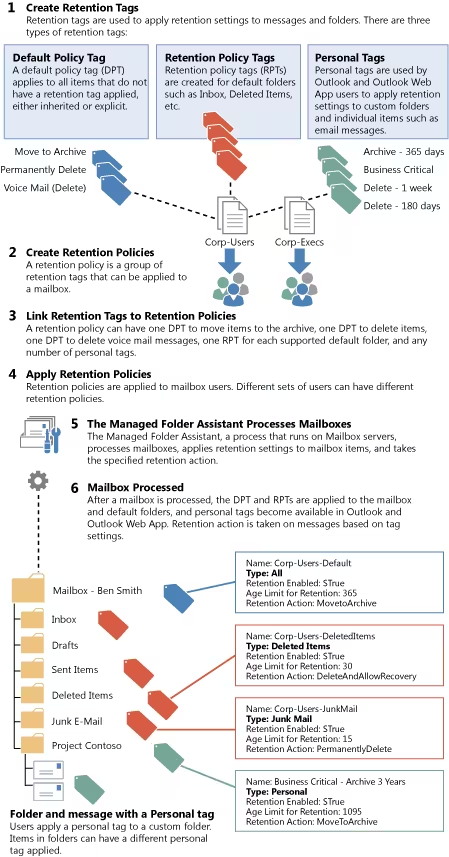
1. Default Policy Tags (DPT)
Default Policy Tags apply automatically to all mailbox items that do not already have another retention tag assigned.
Key characteristics:
- One DPT per retention policy
- Ensures baseline retention rules
- Commonly used for organization‑wide cleanup or archiving
Example:
Delete all mailbox items after 30 days.
DPTs are especially useful when organizations want a consistent retention baseline without relying on user behavior.
2. Retention Policy Tags (RPT)
Retention Policy Tags are applied to specific mailbox folders, such as:
- Inbox
- Sent Items
- Deleted Items
- Calendar
- Tasks
Key characteristics:
- Override Default Policy Tags
- Provide folder‑level control
- Useful for folders with high data churn
Example:
Automatically delete items in Deleted Items after 30 days.
Using RPTs improves storage efficiency and reduces mailbox clutter while maintaining compliance.
3. Personal Tags
Personal tags allow end users to decide how long specific emails should be retained.
Key characteristics:
- Visible in Outlook and Outlook on the web
- User‑driven retention decisions
- Optional for organizations
Example:
Archive this email after 1 year.
While personal tags provide flexibility, many regulated industries restrict or disable them to reduce compliance risks.
What Are Retention Policies in Exchange Online?
Retention policies are containers that group retention tags together and apply them to user mailboxes.
A retention policy can include:
- One Default Policy Tag
- Multiple Retention Policy Tags
- Multiple Personal Tags
Each mailbox can have only one retention policy, but that policy can contain many tags.
How Retention Policies Are Applied
Retention policies in Exchange Online are applied at the mailbox level, not on individual folders by default.
Application methods:
- Manually assigned by administrators
- Automatically applied via PowerShell or dynamic groups
- Updated as organizational needs evolve
Once assigned, Exchange Online evaluates mailbox items regularly through the Managed Folder Assistant, enforcing retention actions silently in the background.
Retention Actions Explained
Retention tags and retention policies in Exchange Online support several actions:
Delete and Allow Recovery
Items are moved to the Recoverable Items folder, allowing restoration within the deleted item retention window.
Permanently Delete
Items are permanently removed and cannot be recovered by users.
Move to Archive
Items are moved to the user’s In‑Place Archive mailbox, reducing primary mailbox size while maintaining access.
Mark as Record
Items become immutable and cannot be edited or deleted by users.
Each action supports different compliance and storage management strategies.
Retention Period Calculation Logic
Retention timing is based on:
- Date received (emails)
- Date created or modified (calendar, tasks)
- User‑defined classification
Correctly configuring start points ensures predictable results and avoids unintended deletions.
Practical Use Cases for Retention Tags and Retention Policies in Exchange Online
Regulatory Compliance
Industries such as finance, healthcare, and legal services rely on enforced retention rules to comply with regulations like GDPR, HIPAA, and SOX.
Storage Optimization
Automatically archiving or deleting older emails keeps mailboxes manageable and reduces storage costs.
Litigation Readiness
Retention ensures records are preserved consistently, reducing discovery risks.
Information Governance
Retention tags align with broader Microsoft Purview data lifecycle strategies.
Best Practices for Implementing Retention Policies
- Start Simple
Begin with a default retention policy before adding complexity. - Document Retention Requirements
Work with legal and compliance teams before configuring tags. - Limit Personal Tags (If Needed)
Prevent inconsistent retention behaviors in regulated environments. - Test Before Broad Deployment
Apply policies to pilot users and monitor results. - Monitor with Audit Logs and Reports
Verify that retention actions align with expectations.
Common Mistakes to Avoid
- Assigning multiple policies to a mailbox (not supported)
- Overlapping retention rules that cause confusion
- Permanent deletion without business approval
- Assuming retention equals backup
Retention is about governance—not disaster recovery.
Retention vs. Microsoft Purview Retention Policies
Exchange Online retention policies should not be confused with Microsoft Purview retention policies, which work across:
- Exchange
- SharePoint
- OneDrive
- Teams
Exchange retention tags offer mailbox‑level precision, while Purview policies provide service‑wide governance. Many organizations use both together.
Managing Retention via PowerShell
Although the Microsoft 365 admin center supports retention configuration, PowerShell provides greater control.
Administrators commonly use PowerShell to:
- Create retention tags
- Modify retention periods
- Assign policies at scale
Proper permissions and testing are critical before making changes.
Monitoring Retention Behavior
Retention actions do not occur instantly. The Managed Folder Assistant processes mailboxes on a recurring schedule.
You can:
- Track mailbox size changes
- Review audit logs
- Validate archive movement
Patience and ongoing monitoring are essential for accurate evaluation.
Final Thoughts
Retention tags and retention policies in Exchange Online provide a powerful, flexible way to govern email content throughout its lifecycle. When designed thoughtfully, they help organizations balance compliance, storage efficiency, and user productivity without manual intervention.
By understanding how tags work, grouping them into effective policies, and applying best practices, administrators can transform email retention from a compliance burden into a strategic advantage.
Whether you’re just starting with Exchange Online or refining an existing setup, mastering retention tags and retention policies is a critical skill for modern Microsoft 365 administrators..
How to Become a Microsoft 365 Support Engineer: Step-by-Step Career Guide
Microsoft 365 Tenant Explained: Definition, Examples & Best Practices
Microsoft 365 Admin Roles Explained: Complete Guide to Global, Exchange & Entra
