Privileged Identity Management Setup Guide is the foundation of modern identity security, and in this blog, I will teach you PIM exactly the way I implement it in real enterprise environments. This is not theoretical knowledge—this is battle-tested guidance from hands-on experience with Microsoft Entra ID Privileged Identity Management.
Organizations fail at PIM not because the product is complex, but because they misunderstand the philosophy behind privileged access. By the end of this Privileged Identity Management Setup Guide, you will think about admin access the way security architects do.
Table of Contents
Why Privileged Identity Management Is Mission-Critical
Before touching any setup steps, you must understand why Privileged Identity Management exists.
Traditional admin accounts are:
- Always active
- Rarely audited properly
- Highly attractive to attackers
PIM introduces Just-In-Time (JIT) access, approval workflows, and continuous auditing.
From a security standpoint, this achieves:
- Reduced attack surface
- Zero standing privileges
- Enforced least privilege
- Full accountability
This Privileged Identity Management Setup Guide focuses on risk reduction, not just configuration.
Core Concepts You Must Master Before PIM Setup
If you skip this section, you will misconfigure PIM.
1. Eligible vs Active Roles
- Eligible: User can activate when needed
- Active: User currently holds elevated access
Best practice:
Nobody should be permanently active unless Microsoft mandates it.
Understanding this distinction is crucial to this Privileged Identity Management Setup Guide.
2. Just-in-Time Elevation
JIT ensures:
- Admin privileges exist only during a defined window
- Time-bound risk exposure
- Full logging of activations
This is the security heart of PIM.
3. Approval and MFA Enforcement
PIM enforces:
- Multi-Factor Authentication at activation
- Business-based approval models
In this Privileged Identity Management Setup Guide, we design approval flows that balance security and operational speed.
Licensing Requirements for PIM
Before configuration, validate licensing.
Required:
- Microsoft Entra ID P2 (Azure AD Premium P2)
Included in:
- Microsoft 365 E5
- Enterprise Mobility + Security E5
⚠️ Without Entra P2, this Privileged Identity Management Setup Guide will not work.
Step-by-Step Privileged Identity Management Setup Guide
Now we move into hands-on implementation.
Step 1: Enable Privileged Identity Management
- Go to Microsoft Entra Admin Center
- Navigate to Identity Governance → Privileged Identity Management
- Click Get started
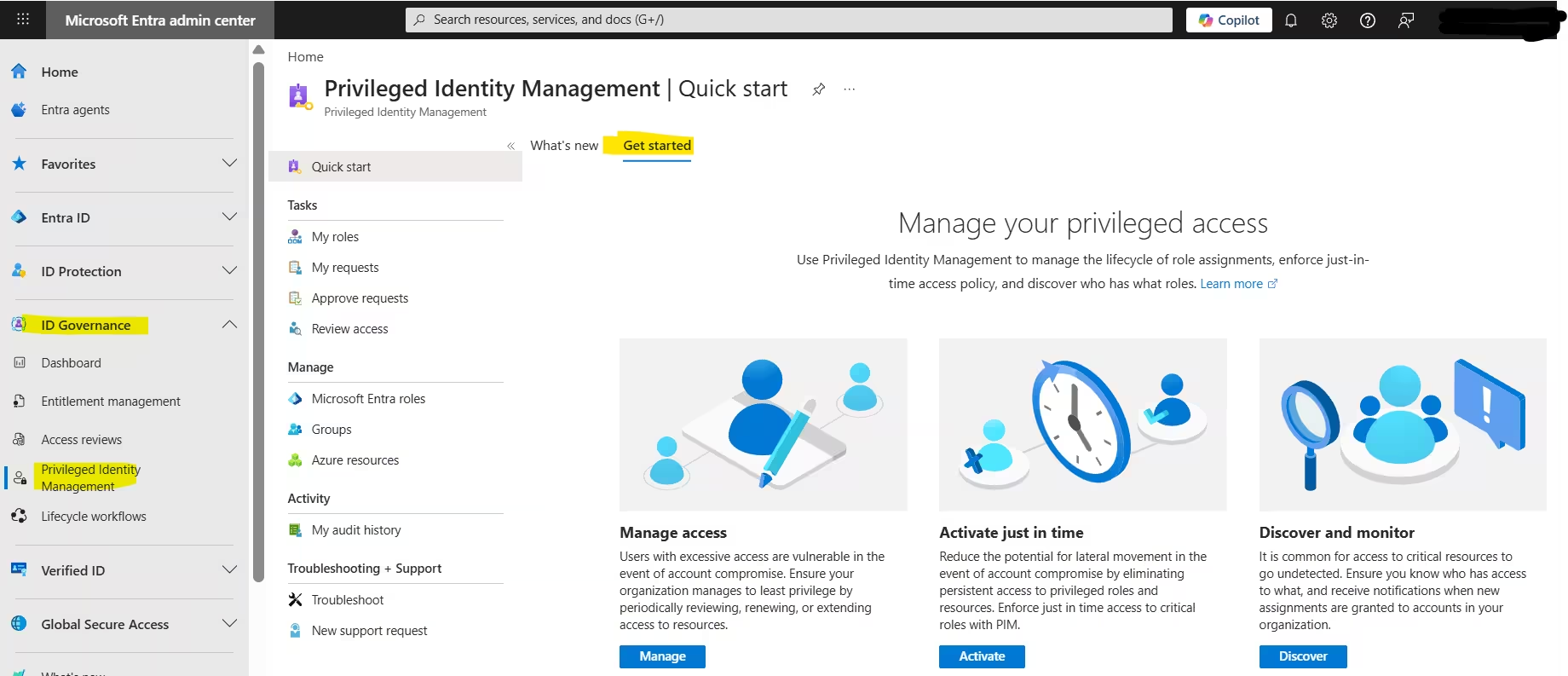
This initializes the PIM service.
At this point, you officially begin implementing this Privileged Identity Management Setup Guide.
Step 2: Identify Privileged Roles
Not all roles are equal.
High-risk roles (must be PIM-managed):
- Global Administrator
- Privileged Role Administrator
- Security Administrator
- Exchange Administrator
- SharePoint Administrator
My expert recommendation: Start with Global Admin only, stabilize PIM, then expand.
Microsoft 365 Admin Roles Explained: Complete Guide to Global, Exchange & Entra
Step 3: Assign Eligible Roles (Never Active First)
- Open Entra AD roles & Admin
- Select a role
- Choose Add assignments
- Set assignment type as Eligible
- Define duration (e.g., 1 year)
This enforces least privilege per this Privileged Identity Management Setup Guide.
Step 4: Configure Role Settings (Critical Step)
This is where most people fail.
For each role:
- Require MFA on activation
- Require justification
- Require approval (for Tier‑0 roles)
- Set maximum activation duration (1–4 hours)
This configuration is non-negotiable in a mature Privileged Identity Management Setup Guide.
Designing Approval Workflows Like a Pro
Approval should protect security, not block productivity.
Best Practice Approval Model:
- Tier‑0 roles → Manual approval
- Tier‑1 roles → Auto-approval + MFA
- Tier‑2 roles → Conditional Access controlled
Example:
- Global Admin → Approval by Security Lead
- Exchange Admin → No approval, MFA required
This layered approach aligns perfectly with this Privileged Identity Management Setup Guide.
Step 5: Configure PIM Alerts
Alerts tell you when things go wrong.
Enable alerts for:
- Too many Global Admins
- Roles assigned outside PIM
- Expired role assignments
You should review alerts weekly.
This turns this Privileged Identity Management Setup Guide into a monitoring strategy, not just setup.
Step 6: Enable PIM for Azure Resources (Often Ignored)
PIM isn’t limited to Entra ID roles.
You must:
- Go to PIM → Azure Resources
- Onboard your subscriptions
- Apply eligible role assignments
This prevents:
- Permanent Owner access
- Subscription takeovers
A complete Privileged Identity Management Setup Guide always covers Azure resources.
PIM & Conditional Access Integration
This is advanced but powerful.
Combine:
- PIM activation
- Conditional Access policies
Example:
- Require compliant device during activation
- Block risky sign-ins
- Limit access by location
Security maturity skyrockets when this Privileged Identity Management Setup Guide integrates Conditional Access.
Proven Conditional Access Policy Best Practices for Stronger Cloud Security
Audit and Reporting in PIM
Security teams love visibility.
PIM logging includes:
- Who activated a role
- When they activated it
- Why they activated it
- How long access lasted
Export logs to:
- Microsoft Sentinel
- Azure Monitor
Auditing completes the lifecycle in this Privileged Identity Management Setup Guide.
Common Mistakes I See in PIM Implementations
Avoid these errors:
- Assigning active roles permanently
- No approval for Global Administrator
- No MFA on activation
- Ignoring alert configuration
- No process documentation
This Privileged Identity Management Setup Guide exists to help you avoid painful security incidents.
Recommended PIM Governance Model
From experience:
- Quarterly role reviews
- Monthly activation review
- Incident-based privilege revocation
- Annual architecture audit
Without governance, Privileged Identity Management loses its meaning.
Real-World PIM Setup Checklist
PIM enabled
Least privilege enforced
Tiered admin roles
MFA everywhere
Approval where needed
Logs integrated with SIEM
This checklist ensures your Privileged Identity Management Setup Guide is production-ready.
Final Thoughts: Why PIM Separates Mature and Immature Security
Privileged Identity Management is not a checkbox security control. It is a mindset.
Organizations that master this Privileged Identity Management Setup Guide:
- Reduce breach blast radius
- Improve compliance posture
- Gain operational confidence
If you implement PIM exactly as taught here, your environment will already be ahead of 80% of enterprises.
