Litigation Hold and In Place Hold are two cornerstone retention controls every Exchange administrator must understand—whether you run Exchange Online, Exchange Server on‑premises, or a hybrid setup. In this lesson, I’ll teach you how each hold works under the hood, why Microsoft’s modern guidance favors eDiscovery case holds (Purview) plus Litigation Hold in the cloud, and exactly how to deploy, monitor, and troubleshoot both.
By the end, you’ll be able to explain Litigation Hold and In Place Hold to your security, legal, and compliance stakeholders—and implement them the right way.
Table of Contents
What Problem Do Holds Actually Solve?
When an organization faces an investigation, audit, or lawsuit, you must preserve potentially relevant data—even if users try to delete or edit it. Litigation Hold and In Place Hold both ensure mailbox content is retained beyond normal mailbox cleanup cycles. The difference is how they preserve data and where Microsoft wants you to use them today.
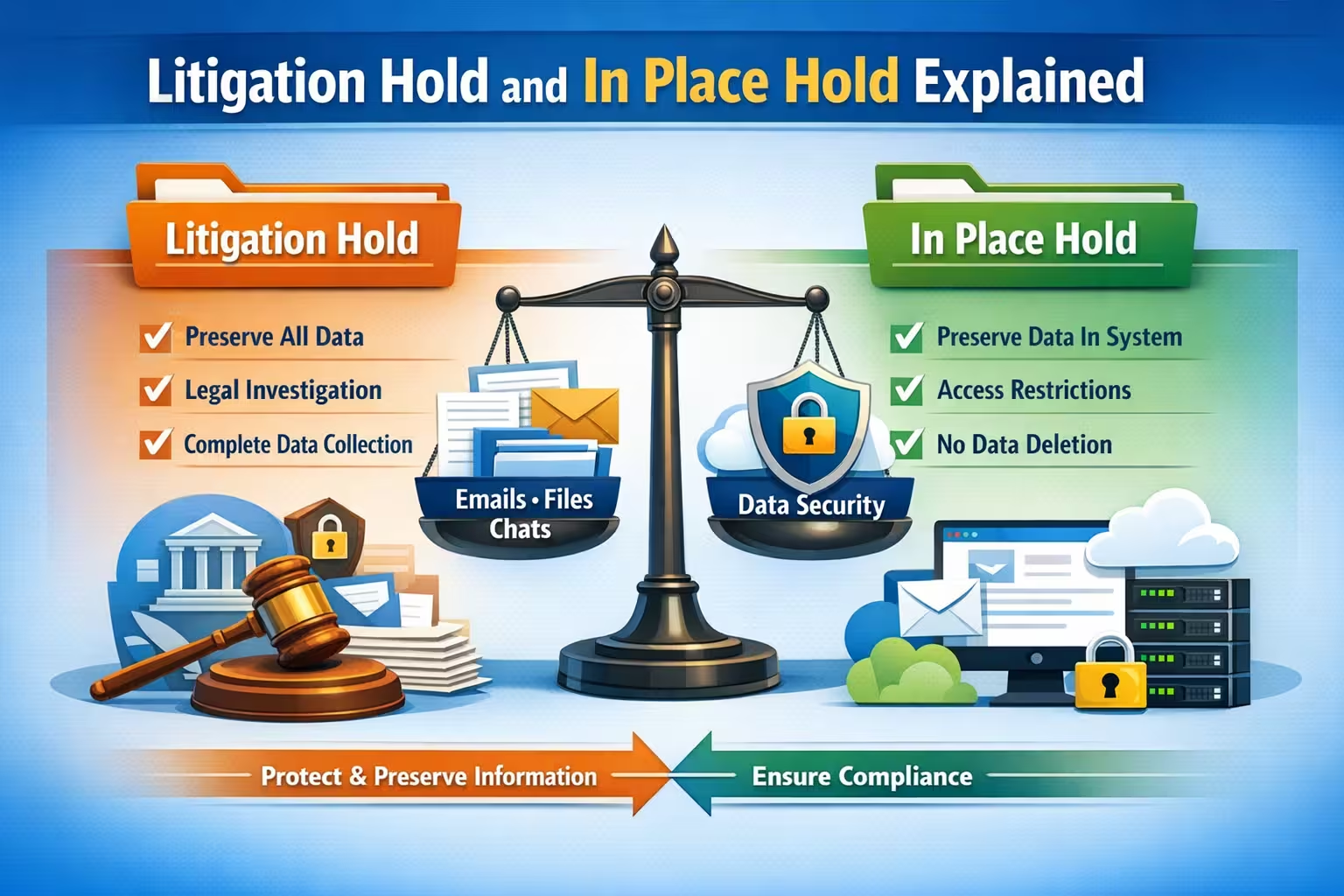
- Litigation Hold: A mailbox‑level switch that preserves everything in the mailbox once enabled, keeping all versions of items. It’s simple, broad, and resilient.
- In-Place Hold: A query‑based or time‑based hold that targets specific items (e.g., by keywords, senders, date range). It’s selective and scoped—traditional on‑prem admins still use it.
In Exchange Online, the modern pattern is to use Litigation Hold and In Place Hold concepts via Microsoft Purview eDiscovery case holds (Core/Advanced) for scoping and case management, and to rely on Litigation Hold when you need that “catch‑all” safety net. In many enterprises, Litigation Hold and In-Place Hold both play a role depending on the use case and environment.
Key Concepts You Must Know
1) Recoverable Items Folder & Versions
Both Litigation Hold and In Place Hold work by using hidden subfolders (Deletions, Purges, Versions, DiscoveryHolds) inside Recoverable Items. When items are deleted or edited, the original versions are silently captured here and retained per hold rules.
2) Single Item Recovery vs Holds
Single Item Recovery (SIR) prevents hard deletes for a set window. Holds supersede SIR by preserving items beyond normal retention windows. In regulated environments, lawyers will expect you to apply Litigation Hold and In Place Hold appropriately, not rely on SIR alone.
3) Query vs Blanket Preservation
- Litigation Hold = mailbox-wide preservation.
- In-Place Hold = query/time-scoped, useful when legal scope is narrow.
4) End-User Experience
Users can still delete or edit items; Litigation Hold and In Place Hold ensure the original content remains discoverable to compliance/eDiscovery teams.
Exchange Online vs On‑Prem: What to Use When
- Exchange Online (Microsoft 365)
- Preferred approach: Purview eDiscovery holds for case-based scoping, plus Litigation Hold for mailbox-wide capture. This gives you modern auditing, case management, and compliance workflows.
- Classic “In-Place eDiscovery & Hold” features still exist in legacy contexts, but Microsoft’s direction is firmly Purview-first. When I teach Litigation Hold and In Place Hold, I emphasize that cloud-first orgs should standardize on Purview cases + Litigation Hold for consistency.
- Exchange Server on‑prem (2016/2019)
- In-Place Hold is still common on-prem for granular scope, with Litigation Hold used for blanket preservation. Hybrid orgs often keep Litigation Hold and In Place Hold knowledge handy to manage both clouds and servers.
Exchange Online vs On-Prem Exchange
Licensing at a Glance (What I Tell Legal & IT)
- Exchange Online Plan 2 or Microsoft 365 E3/E5 typically covers Litigation Hold.
- Purview eDiscovery (Standard/Core) is included with E3; eDiscovery (Premium/Advanced) requires E5 or add-on.
When you propose using Litigation Hold and In Place Hold in the cloud, confirm your exact SKU coverage and any add-ons with your licensing team.
Storage, Quotas, and Performance
Holds increase data in Recoverable Items, potentially growing quickly with high-delete or high-edit mailboxes. Watch:
- Recoverable Items Quota (automatically higher on hold in Exchange Online)
- Dumpster health, database growth (on‑prem)
- Journaling and retention labels, if also in use.
When I implement Litigation Hold and In Place Hold, I always coordinate with storage owners to avoid surprises and report projected growth based on mailbox behaviors.
When to Use Litigation Hold vs In‑Place Hold
Use Litigation Hold when:
- The legal team demands a catch-all preservation for a custodian.
- You need immediate protection while scoping an investigation.
- You want simple, mailbox-wide capture with minimal configuration.
Use In-Place Hold (or Purview case holds) when:
- Legal defines specific scope (keywords, custodians, date range).
- You’re on-prem and want to avoid capturing everything for everyone.
- You need targeted holds for a temporary matter.
In a modern cloud-first shop, I structure Litigation Hold and In Place Hold as complementary: Litigation Hold for blanket safety; eDiscovery case holds for surgical precision.
Step-by-Step: Litigation Hold in Exchange Online
Goal: Enable Litigation Hold and In Place Hold knowledge by practicing mailbox-level Litigation Hold first.
Enable via Exchange Admin Center (EAC)
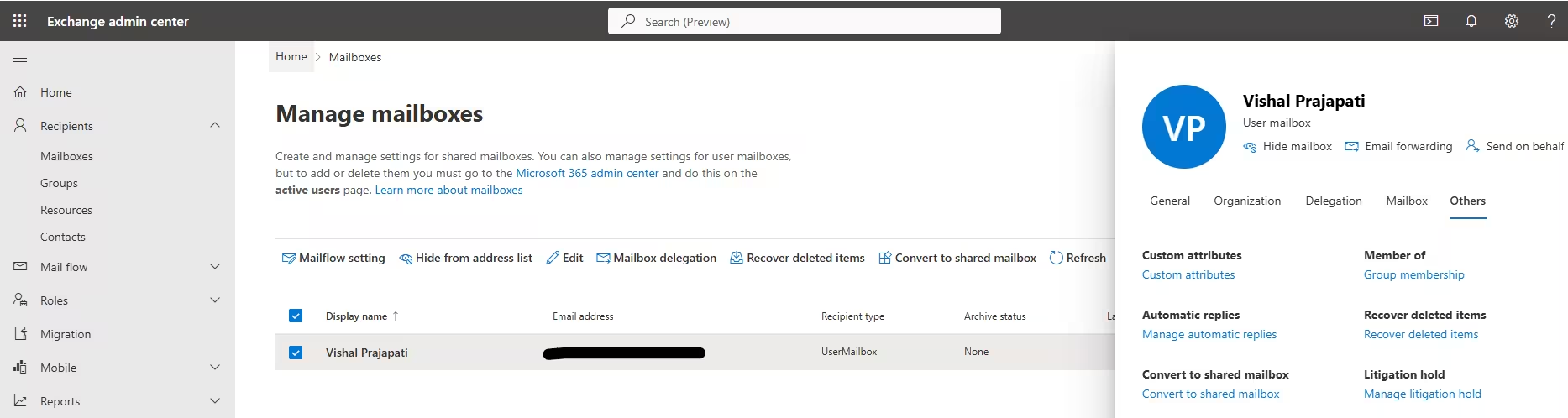
- Exchange Admin Center → Recipients → Mailboxes.
- Select the mailbox → Others → Litigation Hold
- Turn on Litigation hold.
- Optionally set Hold duration (days). Leave blank for indefinite.
- Optionally add Litigation hold note (visible to user in Outlook on the web), and URL to your policy.
Enable via PowerShell
# Connect to Exchange Online
Connect-ExchangeOnline

# Enable Litigation Hold indefinitely
Set-Mailbox user@contoso.com -LitigationHoldEnabled $true

# Enable Litigation Hold for 365 days with a note and policy URL
Set-Mailbox user@contoso.com -LitigationHoldEnabled $true -LitigationHoldDuration 365 -RetentionComment "Mailbox under legal preservation per case 24-017." -RetentionUrl "https://contoso.com/policies/legal-hold"

# Verify
Get-Mailbox user@contoso.com | Format-List LitigationHold*
What Actually Happens
- All deletes and edits are preserved in Recoverable Items.
- MAPI/OWA shows an informational banner if you set notes.
- Discovery searches (Purview eDiscovery) can find retained items even if the user “emptied Deleted Items.”
Step-by-Step: In‑Place Hold (On‑Prem) & Purview Case Holds (Cloud)
On‑Prem (Exchange Admin Center)
- Compliance Management → In-Place eDiscovery & Hold.
- New Search → define mailboxes, keywords, date range.
- Check Place content matching the search query in selected mailboxes on hold.
- Optional Hold indefinitely or set duration.
- Save and start the search/hold.
On‑Prem (PowerShell)
# Example: Create a query-based In-Place Hold for legal keywords
New-MailboxSearch -Name "Case24-017-Hold" -SourceMailboxes "user1","user2" -SearchQuery '(subject:"Merger" OR body:"NDA") AND sent>=01/01/2026 AND sent<=02/29/2026' -InPlaceHoldEnabled $true -TargetMailbox discoverysearchmailbox@contoso.com -LogLevel Full
Exchange Online (Modern Approach using Microsoft Purview)
- Go to Microsoft Purview portal → eDiscovery (Standard or Premium).
- Create a Case, define Custodians, set Hold with conditions (locations, date range, conditions).
- This applies a case-based hold behind the scenes (more auditable, enterprise-grade).
- Use alongside Litigation Hold and In Place Hold knowledge—Purview replaces legacy In‑Place Hold in practice for cloud scenarios.
Practical Scenarios
Scenario 1: Immediate Risk, Scope TBD
Enable Litigation Hold on suspected custodians immediately. Start Purview eDiscovery scoping same day. This ensures Litigation Hold and In Place Hold strategy covers both broad preservation and targeted discovery.
Scenario 2: Narrow Investigation Window
If legal only needs Jan–Feb emails about “NDA,” use a Purview case hold with those conditions. For on-prem, set an In Place Hold with a query and date range. Here, Litigation Hold and In Place Hold play to their strengths—precision with lighter storage impact.
Scenario 3: Departing Employee Under Investigation
Convert the mailbox to shared or leave as user mailbox, keep Litigation Hold enabled, disable sign-in. This preserves content while HR and Legal proceed. Teach junior admins that Litigation Hold and In Place Hold decisions must involve HR/Legal sign-off.
Monitoring, Reporting, and Governance
- Audit: In the cloud, rely on Purview audit logs; on‑prem, track admin changes and mailbox search logs.
- Storage Growth: Review Recoverable Items usage for mailboxes under hold.
- Periodic Review: Work with Legal to reassess holds quarterly. Stale holds create unnecessary cost and risk.
- Documentation: Record who requested the hold, justification, scope, and expiration. Treat Litigation Hold and In Place Hold as controlled changes requiring tickets and approvals.
Common Pitfalls (and the Fix)
- Enabling a Hold Too Late
- Fix: As soon as a potential matter is identified, place Litigation Hold on custodians. Then refine with case holds.
- Forgetting Retention Labels/Policies
- Fix: Understand that M365 retention coexists with holds. Holds preserve; labels/policies govern lifecycle. Validate precedence: holds prevent deletion even if a retention policy would allow it.
- Mailbox Moves Without Planning
- Fix: In hybrid, confirm that Litigation Hold and In Place Hold remain intact post‑move—or reapply in the destination as needed.
- Overly Broad Holds
- Fix: Introduce case holds for scoped preservation and keep Litigation Hold only where justified. Prune old holds.
- Ignoring Quotas
- Fix: Monitor Recoverable Items quotas. Where heavy edits/deletes exist, engage Legal to narrow scope or sunset old holds.
Troubleshooting Checklist
- User says: “I deleted it permanently” → Verify Litigation Hold or case hold is active; run eDiscovery search.
- Not Seeing Preserved Versions → Check that LitigationHoldEnabled is
$true(or that case hold includes the mailbox), ensure mailbox isn’t exempted. - Quota Warnings → Review Recoverable Items health, consider increasing quota (cloud), or adjust hold scope/duration.
- eDiscovery Results Missing Expected Items → Validate time zones and date filters; remember modified times vs received times; tweak query syntax.
Recommended Governance Pattern
- Define a Litigation Hold and In Place Hold playbook with:
- intake template from Legal,
- authorization matrix,
- standardized mailboxes/custodians onboarding,
- Purview case creation steps,
- verification checklist,
- reporting cadence,
- exit/expiration workflow.
- Train your helpdesk to recognize the keywords: if Legal mentions a “legal hold,” route to the compliance admin group immediately. The faster Litigation Hold and In Place Hold are applied, the lower your risk.
PowerShell Snippets You’ll Reuse
Bulk enable Litigation Hold for a CSV of addresses:
Connect-ExchangeOnline

Import-Csv .\custodians.csv | ForEach-Object {

  $upn = $.UserPrincipalName

  Write-Host "Enabling Litigation Hold for $upn"

  Set-Mailbox $upn -LitigationHoldEnabled $true -LitigationHoldDuration 0

}

# Verify

Import-Csv .\custodians.csv | ForEach-Object {

  Get-Mailbox $.UserPrincipalName | ft UserPrincipalName, LitigationHoldEnabled, LitigationHoldDuration

}
Report Recoverable Items size for mailboxes under hold:
Connect-ExchangeOnline

Get-ExoMailbox -ResultSize Unlimited -Filter "LitigationHoldEnabled -eq $true" |

  Get-ExoMailboxFolderStatistics -FolderScope RecoverableItems |

  Where-Object {$.Name -eq "Recoverable Items"} |

  Select-Object Identity, Name, ItemsInFolder, @{n="Size(MB)";e={[math]::Round(($.FolderAndSubfolderSize.Split("(")[0].TrimEnd(" B"))/1MB,2)}} |

  Sort-Object "Size(MB)" -Descending
Create an on‑prem In Place Hold (query-based) quick start:
New-MailboxSearch -Name "Case-Contoso-TradeHold" -SourceMailboxes "trader1","trader2" -SearchQuery '("trade blotter" OR "front running") AND received>=01/01/2026' -InPlaceHoldEnabled $trueFAQs
Q: Does Litigation Hold stop users from deleting?
A: No. They can delete; the original is preserved. This is why Litigation Hold and In Place Hold protect you even when users “clean their mailbox.”
Q: Should I use both Litigation Hold and a case hold?
A: Often yes—Litigation Hold as a safety net, plus a case hold for targeted scope and case management. This pairing is how Litigation Hold and In Place Hold strategies deliver both simplicity and precision.
Q: Do holds impact PST exports or mailbox moves?
A: Holds don’t block exports or moves, but retained content increases size. Budget time and bandwidth accordingly.
Q: How long should holds last?
A: As long as Legal requires. For Litigation Hold and In Place Hold, use indefinite holds for uncertain timelines, or set explicit durations when the matter is defined.
Recap (What to Remember)
- Litigation Hold and In-Place Hold preserve mailbox data for legal/regulatory needs.
- In the cloud, Litigation Hold + Purview case holds is the winning combo.
- On‑prem, In-Place Hold remains useful for scoped preservation.
- Always coordinate with Legal, watch Recoverable Items growth, and document your process.
- Master the PowerShell: it’s how you scale Litigation Hold and In-Place Hold across custodians fast.
Next Steps (Hands-On)
- Identify a test mailbox; enable Litigation Hold and send/delete sample emails.
- In Purview, create a sample case and apply a scoped hold to that mailbox.
- Run an eDiscovery search and confirm retained items appear.
- Draft your internal Litigation Hold and In Place Hold SOP—use the governance pattern above.
Summary
This blog provides a comprehensive, expert-level breakdown of Litigation Hold and In-Place Hold in Exchange, written as a teaching guide for administrators who want to master compliance preservation in both Exchange Online and on-premises environments. It explains how each hold type works, what problem they solve, and how the Recoverable Items architecture ensures that deleted or modified mailbox content is securely retained for legal or regulatory needs.
The summary covers the differences between Litigation Hold (broad, mailbox-wide retention) and In‑Place Hold (query-based, targeted retention), while emphasizing Microsoft’s modern shift toward Purview eDiscovery case holds for cloud environments. It dives into licensing, storage impact, governance, PowerShell examples, best practices, troubleshooting, and real-world scenarios for applying both hold types effectively.
By the end of the post, readers gain a clear understanding of when to use each feature, how to configure them step-by-step, and how to implement an enterprise-ready governance model for Litigation Hold and In-Place Hold across Exchange environments.
