Microsoft 365 Admin Center is the heart of Microsoft’s cloud ecosystem, and if you want to truly master Microsoft 365, this is where your learning must begin. In this complete guide, I will teach you M365 Admin Center exactly the way I train IT administrators in real production environments—not just theory, but practical, hands-on understanding.
Whether you are a beginner sysadmin, a helpdesk engineer moving into administration, or an experienced IT professional migrating workloads to the cloud, this guide will give you confidence, clarity, and control.
Let’s start from the foundation and build your expertise step by step.
How to Become a Microsoft 365 Support Engineer: Step-by-Step Career Guide
Microsoft 365 Tenant Explained: Definition, Examples & Best Practices
Table of Contents
What Is Microsoft 365 Admin Center?
The Microsoft 365 Admin Center is a web-based management portal that allows administrators to manage users, licenses, services, security, compliance, and device integrations across Microsoft 365.
In simple terms:
If Microsoft 365 is the engine, Microsoft 365 Admin Center is the dashboard.
From one centralized interface, you can:
- Create and manage users
- Assign licenses and subscriptions
- Configure Exchange, SharePoint, Teams, and OneDrive
- Monitor service health
- Enforce security and compliance policies
Why Microsoft 365 Admin Center Is Critical for Administrators
As an administrator, your responsibilities go beyond creating users. The Microsoft 365 Admin Center gives you visibility, governance, and operational control.
Here’s why mastering it is essential:
- Centralized management across workloads
- Built-in security and compliance insights
- Real-time service health monitoring
- Integration with Azure Active Directory (Entra ID)
- Scalable for small businesses to large enterprises
A strong understanding of Microsoft 365 Admin Center separates reactive admins from proactive ones.
Understanding Admin Roles in Microsoft 365 Admin Center
Before touching settings, you must understand admin roles. Microsoft uses role-based access control (RBAC) to prevent over-permissioning.
Microsoft 365 Admin Roles Explained: Complete Guide to Global, Exchange & Entra
Common admin roles include:
- Global Administrator – Full control (use sparingly)
- User Administrator – Manage users and groups
- Exchange Administrator – Manage mailboxes and policies
- SharePoint Administrator – Control SharePoint and OneDrive
- Security Administrator – Manage security features
Best Practice: Assign the least privilege necessary. Never use Global Admin for day-to-day tasks.
Navigating the Microsoft 365 Admin Center Dashboard
When you log in to Microsoft 365 Admin Center, the dashboard becomes your command center.
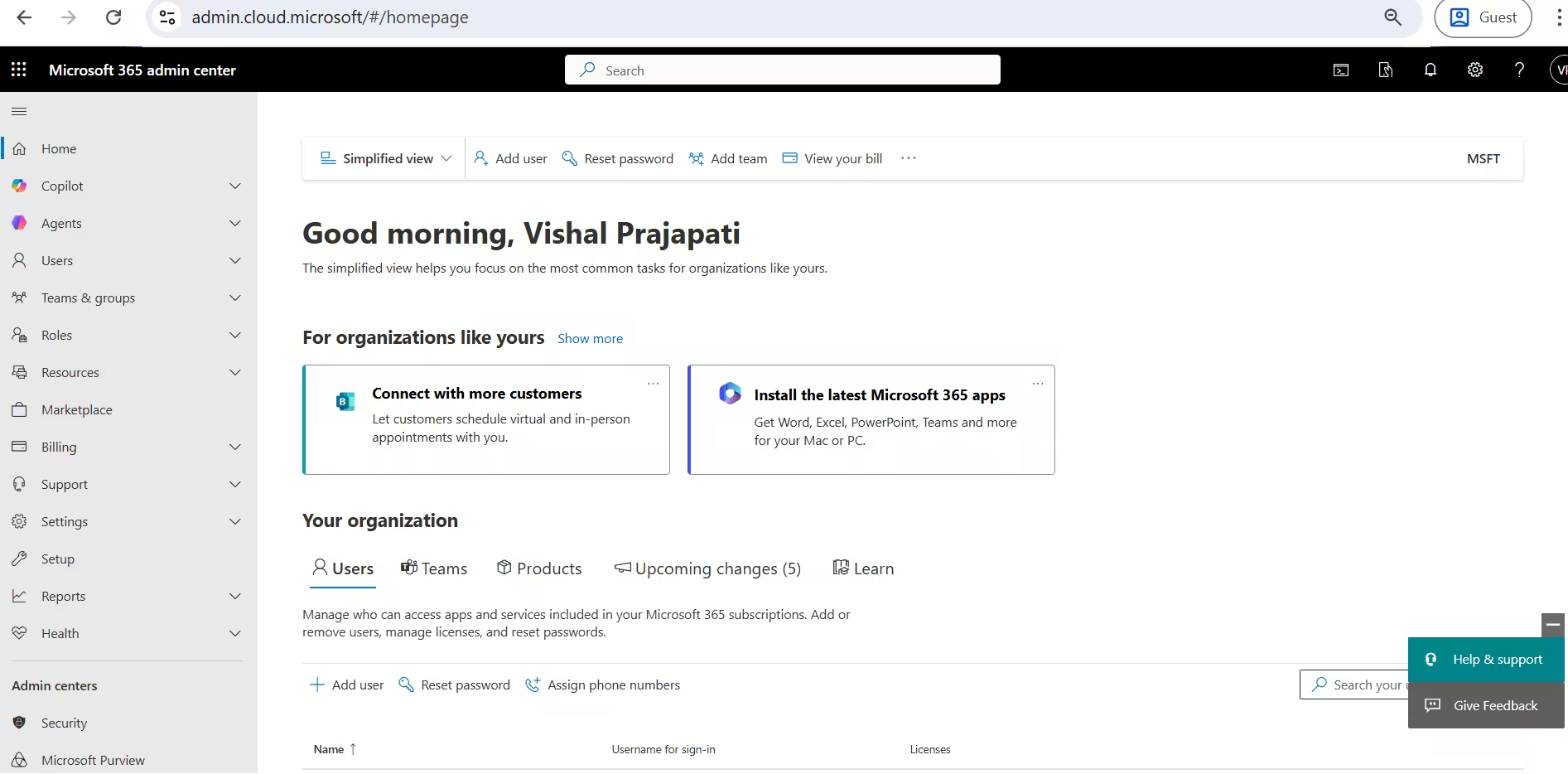
Key sections you must know:
- Home – Shortcuts, alerts, and service announcements
- Copilot – Track all services related to MS365 copilot
- Users – User and guest management
- Teams & Groups – Microsoft Teams and M365 Groups
- Role – Role assignment and role management
- Billing – Licenses, subscriptions, invoices
- Health – Service health and incidents
- Support – For call log with Microsoft and find MS article for resolve issue
- Reports – Productivity and usage insights
- Settings – Organizational configuration
Think of the dashboard as your daily operational cockpit.
User Management in Microsoft 365 Admin Center
User management is one of the most frequent tasks in Microsoft 365 Admin Center.
Creating Users
You can:
- Create users individually
- Add mutiple users
- Sync users from on-premises Active Directory using Azure AD Connect
During creation:
- Assign username and domain
- Set password
- Assign licenses immediately
Managing Existing Users
From the user profile you can:
- Reset passwords
- Block sign-ins
- Add remove license
- Manage roles
- Add/remove user from group
- Convert mailboxes (User ↔ Shared)
Always disable sign-in instead of deleting users when employees leave—this preserves data access. And delete sign-in blocked employee ID after 30 days for Last working days
License Management and Subscriptions
Licensing is where many admins struggle—but Microsoft 365 Admin Center simplifies it when you understand the logic.
Key License Concepts:
- Licenses are assigned per user
- Each license enables specific services
- You can toggle services on/off per user
Common License Types:
- Microsoft 365 Business Basic
- Business Standard
- Business Premium
- Enterprise E3 / E5
Best Practice: Disable unused services (e.g., Yammer, Planner, Sykpe) to reduce risk and confusion.
Managing Microsoft Teams from Admin Center
Microsoft Teams is deeply integrated with Microsoft 365 Admin Center.
From here, you can:
- Control Teams creation
- Configure meeting policies
- Manage external access
- Enable or restrict guest users
Important settings every admin must review:
- External federation
- Anonymous meeting access
- Recording permissions
- Apps and third-party integrations
Teams misconfiguration is one of the biggest security risks—proper admin control is mandatory.
Exchange Admin Center Integration
Although Exchange has its own portal, access begins through Microsoft 365 Admin Center.
You can manage:
- Mailboxes and aliases
- Distribution lists
- Shared mailboxes
- Mail flow rules
- Mail connector
- Reports
Use shared mailboxes for departments—no license required unless archive or advanced features are needed.
SharePoint and OneDrive Administration
From Microsoft 365 Admin Center, you can launch the SharePoint Admin Center to manage collaboration and storage.
Admin capabilities include:
- Control external sharing
- Create new sharepoint site
- Add remove members from sharepoint site
- Set OneDrive storage limits
- Monitor site activity
External sharing should always be more restrictive in SharePoint than Teams.
Security Features Inside Microsoft 365 Admin Center
Security is no longer optional. The M365 Admin Center connects you to Microsoft Defender and security controls.
Key security configurations:
- Multi-Factor Authentication (MFA)
- Secure Score monitoring
- Password expiration policies
- Conditional Access (via Entra ID)
Proven Conditional Access Policy Best Practices for Stronger Cloud Security
Every admin account must use MFA—no exceptions.
Compliance and Data Protection
Compliance management starts from M365 Admin Center and extends into Purview.
Core compliance controls include:
- Data Loss Prevention (DLP)
- Retention labels
- Litigation hold
- Audit logging
These features help organizations meet:
- GDPR
- ISO standards
- Industry regulations
A compliant tenant is a resilient tenant.
Service Health and Message Center
One of the most underrated features of M365 Admin Center is service monitoring.
Service Health:
- Live service status
- Incident details
- Resolution updates
Message Center:
- Upcoming changes
- Feature rollouts
- Action-required updates
Check Message Center weekly to avoid surprises.
Reporting and Analytics
Reports in M365 Admin Center provide insights into:
- User activity
- Adoption trends
- License usage
- Security events
Use reports to:
- Identify inactive users
- Optimize licensing costs
- Improve productivity
Data-driven administration separates good admins from great ones.
Automation and PowerShell Access
Advanced admins use M365 Admin Center alongside PowerShell.
Why PowerShell matters:
- Bulk user management
- Automated reporting
- Faster configuration changes
- Consistency across environments
Start learning:
- Microsoft Graph PowerShell
- Exchange Online PowerShell
Real-World Best Practices for Microsoft 365 Admin Center
Let me summarize best practices I teach every admin:
- Use role-based access
- Enforce MFA everywhere
- Monitor Secure Score regularly
- Review Message Center weekly
- Audit licenses monthly
- Document every configuration change
Final Thoughts
The M365 Admin Center is not just an admin portal—it is the foundation of cloud governance. When you understand it deeply, you stop reacting to problems and start controlling your environment with confidence.
This guide was written to teach, not just explain. If you treat M365 Admin Center as a living system and continue learning, you will always stay ahead as an administrator.
